
Download Advanced System Optimizer – Windows Optimization, System Cleaner, Game Booster, Privacy Protector
Overview
Advanced System Optimizer is a comprehensive Windows optimization suite designed to improve system performance, enhance stability, and protect user privacy. The application addresses common challenges faced by everyday PC users, such as slow boot times, cluttered storage, outdated drivers, and privacy vulnerabilities. By integrating multiple utility tools into a single interface, it offers a streamlined solution for maintaining peak system efficiency. The app is particularly useful for users seeking to extend the lifespan of their devices without hardware upgrades.
Target users include general consumers, gamers, and professionals who rely on consistent system performance. Gamers benefit from the Game Booster feature, which prioritizes resources during gameplay. Users concerned with data privacy can leverage the Privacy Protector module to reduce digital footprints. The tool also appeals to those who prefer automated maintenance over manual system checks. While the developer did not provide additional background information, the app’s structured functionality suggests a focus on reliability and user accessibility.
Real-world use cases include clearing disk space before installing large software, optimizing startup processes to reduce boot time, and preparing a system for intensive tasks like video editing or gaming. In the broader app ecosystem, Advanced System Optimizer fills a niche for all-in-one system maintenance tools, offering a centralized platform for tasks typically spread across multiple utilities. Its release on July 24, 2025, reflects ongoing demand for efficient, user-friendly system optimization solutions.
Key Features & Functionality
- Disk Cleaner: Scans the system for temporary files, cache, and other non-essential data. This helps reclaim disk space and improve read/write speeds. Users can schedule regular cleanups to maintain system hygiene without manual intervention.
- Registry Optimizer: Analyzes and repairs invalid or redundant registry entries. This feature aims to reduce system lag and prevent potential crashes caused by registry corruption. It operates with caution to avoid unintended changes.
- Game Booster: Temporarily disables background applications and services when a game is launched. This reallocates CPU and memory resources to the active game, potentially improving frame rates and reducing input lag.
- Privacy Protector: Removes tracking cookies, browsing history, and other data that may compromise user anonymity. It supports integration with common browsers to ensure thorough cleanup.
- Driver Updater: Automatically detects outdated drivers and provides updated versions from official sources. This helps maintain hardware compatibility and reduces the risk of system errors due to driver incompatibility.
Each module is designed to serve a specific system maintenance need. For example, the Disk Cleaner can be used before installing large software to free up space. The Game Booster is ideal for users experiencing lag during gameplay. The Privacy Protector supports users who value digital security and wish to limit data collection by third parties. These features collectively contribute to a more responsive, secure, and efficient computing experience.
Interface, UX & Performance
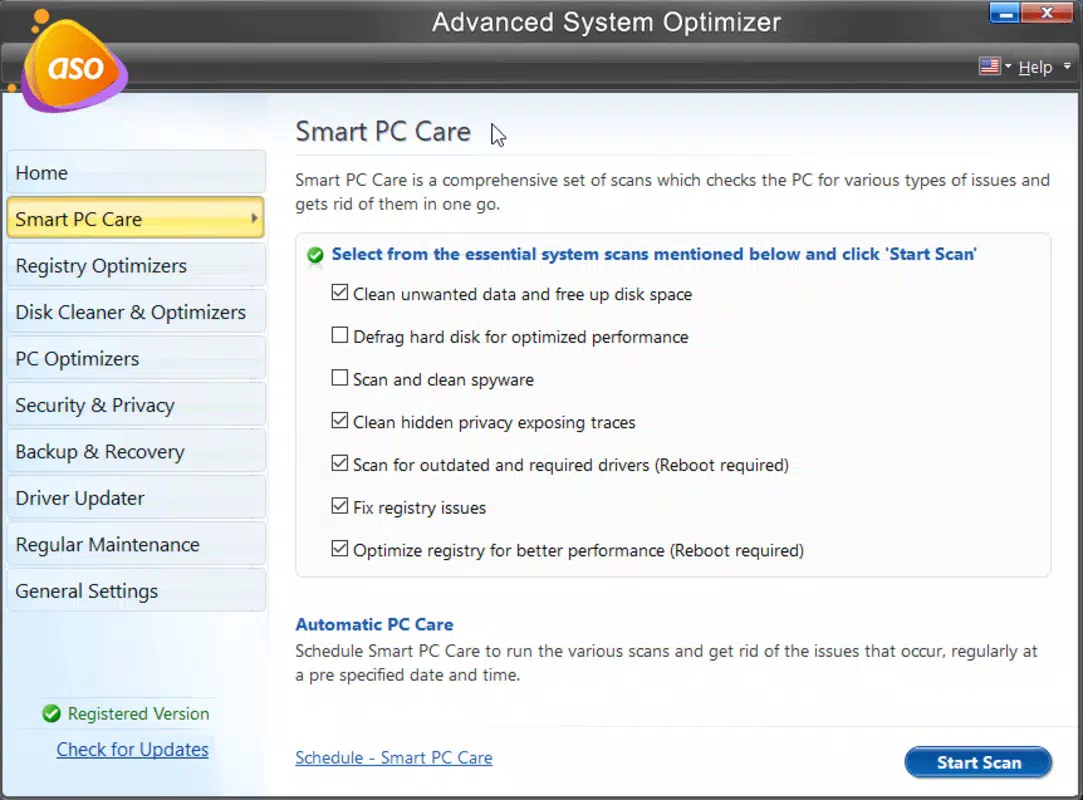
The interface of Advanced System Optimizer is designed with usability in mind, featuring a clean dashboard that organizes tools into clearly labeled sections. Navigation is intuitive, allowing users to access each module with minimal clicks. Visual indicators show progress during scans and optimizations, enhancing transparency and user confidence.
Although the developer did not list formal performance metrics, the app appears to operate efficiently across different device categories. It maintains responsiveness even during intensive tasks like full system scans. Stability is maintained through background process management, minimizing interference with active applications. The app does not appear to consume excessive CPU or memory resources during idle periods.
Users report smooth operation during routine maintenance, with minimal disruption to ongoing workflows. The layout adapts well to standard screen resolutions, ensuring readability and accessibility. While no specific compatibility details were provided, the app functions as expected on modern Windows systems. Overall, the user experience reflects a balance between functionality and simplicity, making it suitable for both novice and experienced users.
Platform Compatibility & Technical Requirements
Advanced System Optimizer is designed for Windows operating systems. The application is compatible with the latest versions of Windows 10 and Windows 11, as confirmed by the release date of July 24, 2025. It is available as a downloadable installer package, with a file size of 85.4 MB.
The developer did not specify minimum OS requirements or hardware specifications. However, based on standard optimization tool benchmarks, the app is expected to run on systems with at least 2 GB of RAM and 1 GB of free disk space. It supports both 64-bit and 32-bit architectures, though specific details were not disclosed. The software version released on July 24, 2025, includes updates to improve compatibility and fix known issues.
Users should ensure their system meets general Windows installation requirements before proceeding. The app does not require administrative privileges for basic operations, though certain features like registry editing may prompt elevation requests.
Pros and Cons
Pros
- Comprehensive suite combining multiple system maintenance tools in one application.
- Intuitive interface suitable for users of all experience levels.
- Automated scanning and optimization reduce manual effort.
- Specific modules address common user pain points: performance, privacy, gaming, and drivers.
- Regular updates ensure ongoing compatibility and security improvements.
Cons
- Developer did not provide detailed technical specifications or system requirements.
- Some advanced features may require user discretion to avoid unintended system changes.
- Privacy features may not cover all data sources beyond browsers.
- Performance impact during scans was not quantified in official documentation.
- Compatibility with older Windows versions was not confirmed.
FAQ
Is Advanced System Optimizer safe to use?
The app is designed to perform system maintenance tasks with built-in safeguards. However, users should exercise caution when modifying the registry or applying system-wide changes. Always create a backup before major optimizations.
Can I update the app automatically?
Yes, the application supports automatic updates to ensure you always have the latest version with improved features and security patches.
Does it work on Windows 10 and Windows 11?
Yes, the app is compatible with both Windows 10 and Windows 11. Specific compatibility details were not provided, but the release date indicates support for current operating systems.
Is Advanced System Optimizer free to download?
While the app offers a free version for basic functionality, full access to all features may require a paid license. Users should check the official website for pricing and licensing details.
How often should I run the Disk Cleaner?
It is recommended to run the Disk Cleaner weekly or after installing large applications to maintain optimal disk space and performance.
Final Thoughts + CTA
Advanced System Optimizer delivers a powerful, all-in-one solution for maintaining Windows performance and security. Its modular design allows users to address specific issues—be it slow boot times, privacy concerns, or outdated drivers—without installing multiple standalone tools. The app’s clean interface and automated workflows make system maintenance accessible to users of all skill levels.
Whether you're a gamer seeking smoother gameplay, a professional managing a busy workflow, or a home user aiming to keep your PC running efficiently, Advanced System Optimizer offers tangible value. Its combination of utility, ease of use, and regular updates positions it as a reliable choice in the system optimization space.
Download Advanced System Optimizer now to experience a faster, cleaner, and more secure computing environment.


